Never blank on an interview question again
InterviewDone listens to your call, works out what you were actually asked, and hands you an answer built from your own resume, the job description, and your notes.
How it works
Three steps, and none of them happen mid-sentence.
Connect your call
Captures your system audio from Zoom, Meet, or Teams. No bot joins the meeting and nothing appears in the participant list.
It follows along
Separates who is speaking, tells a question from a statement, and keeps track of what has already been covered.
You get an answer
Grounded in the context you gave it: your resume, the job description, your notes, and your past projects.
A card that follows you
Read the answer or the code right beside where you are typing, not across the screen.
- 1. Press Ctrl+Alt+9 to open the card.
- 2. Hold Ctrl+Alt and move the mouse to place it.
- 3. Step through it with Ctrl+Alt+> while you talk or type.
Follows your mouse
Hold Ctrl+Alt and move the mouse: the card comes with you and sits beside the pointer, so it is next to your code instead of on top of it. Let go and it stays where you left it.
Docks to any edge
Push it against the left or right edge and it becomes a full-height column. Push it to the top or bottom and it becomes a short band that shows one line or sentence at a time.
Code or AI answers
It shows AI answers by default, one sentence highlighted at a time, and switches to your captured code solution with a "say this while you type" line for each step. Ctrl+Alt+I flips between them.
Keyboard shortcuts
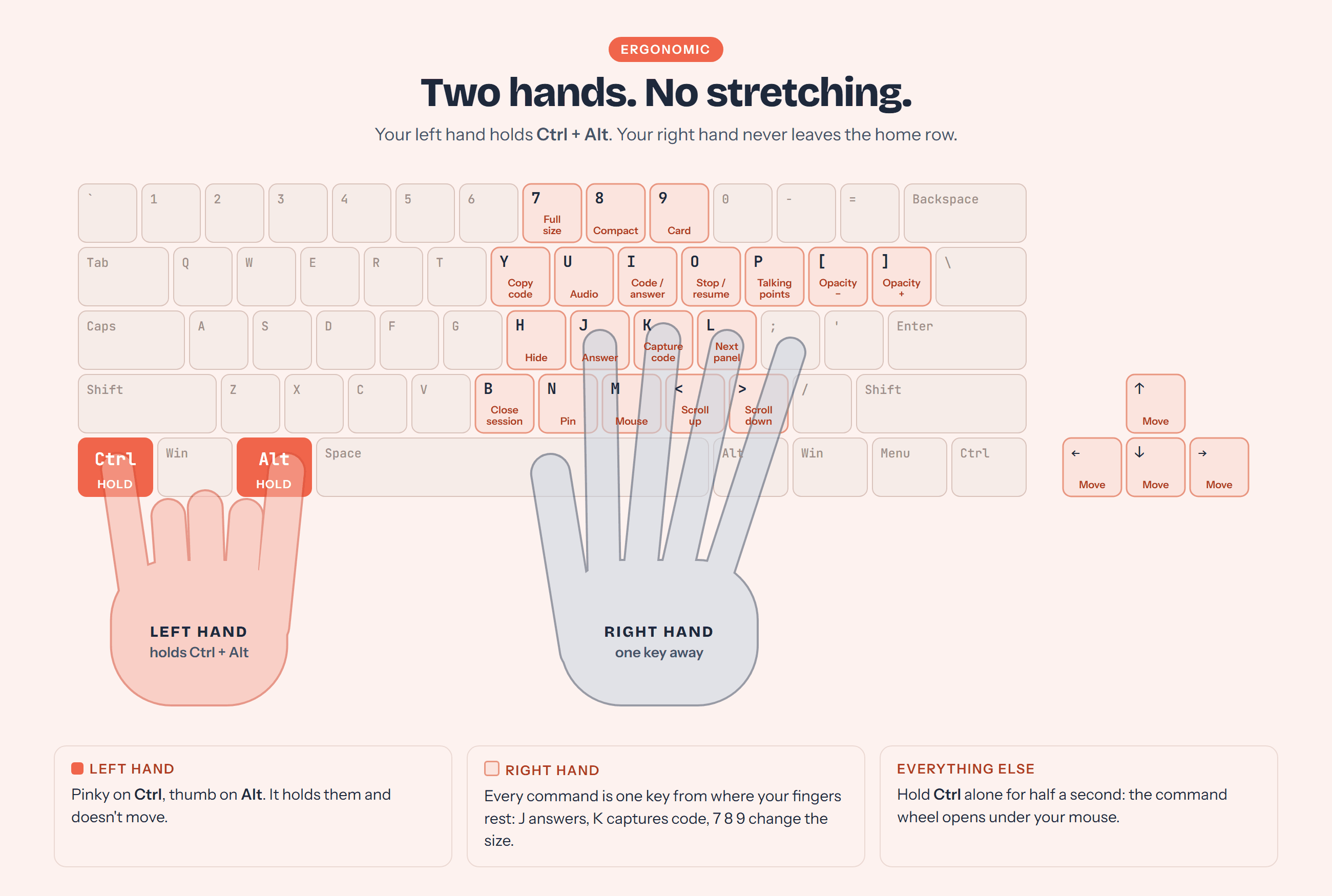
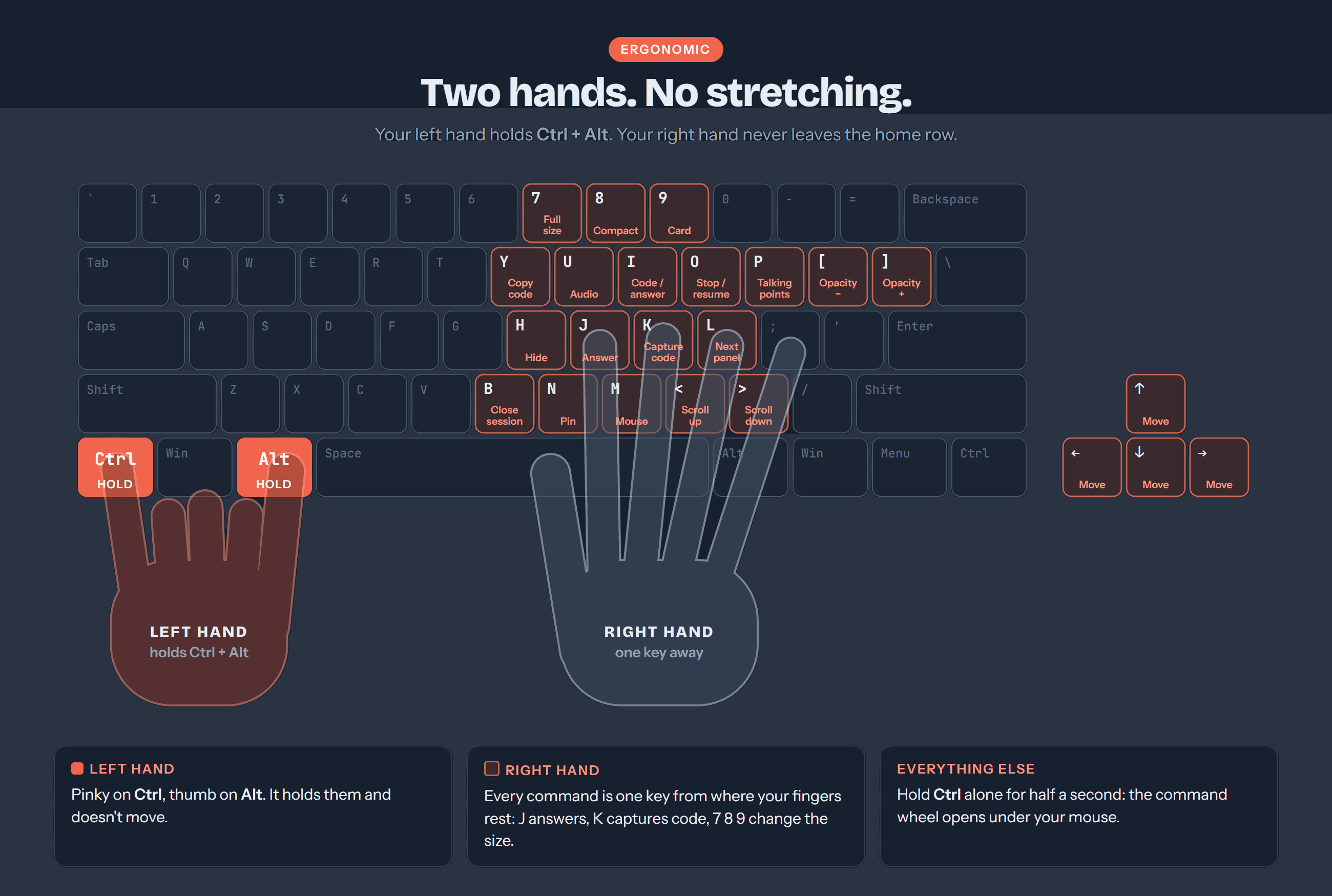
Left hand holds Ctrl+Alt, right hand picks the key. The overlay never takes focus from your meeting.
During the call
- Ctrl+Alt+J
- Answer the last question
- Ctrl+Alt+K
- Solve a code challenge from the screen
- Ctrl+Alt+P
- Talking points
- Ctrl+Alt+N
- Pin the latest answer
- Ctrl+Alt+B
- Close the session
- Hold Ctrl
- Open the command wheel
Sizes and card
- Ctrl+Alt+7
- Full size
- Ctrl+Alt+8
- Compact: half width, so your eyes stay in one spot
- Ctrl+Alt+9
- Open or close the floating card
- Ctrl+Alt+I
- Switch the card between code and AI answers
- Ctrl+Alt+< / >
- Previous / next step or sentence on the card
Overlay
- Ctrl+Alt + mouse
- Drag the overlay; the card docks at the edges
- Ctrl+Alt+Arrows
- Move the overlay
- Ctrl+Alt+< / >
- Scroll the focused panel
- Ctrl+Alt+M
- Mouse on / off (on when a meeting starts)
- Ctrl+Alt+[ / ]
- Opacity down / up
- Ctrl+Alt+H
- Show or hide the overlay
These are the defaults. Any letter or number shortcut can be changed in the app's Commands tab.


See it in action
Ten real screens from the desktop app, in the modes you switch between. No mockups.
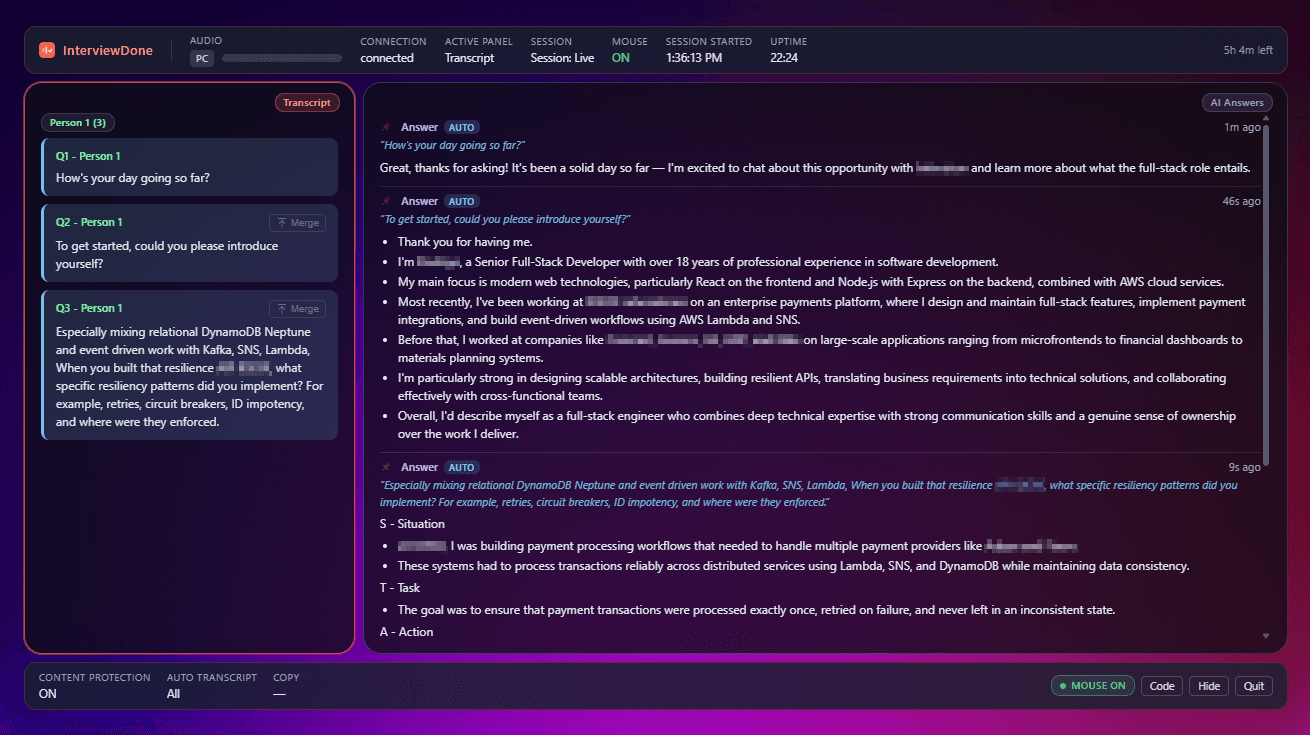
Questions on the left, grounded answers on the right, while the call is still going, and out of your shared screen.
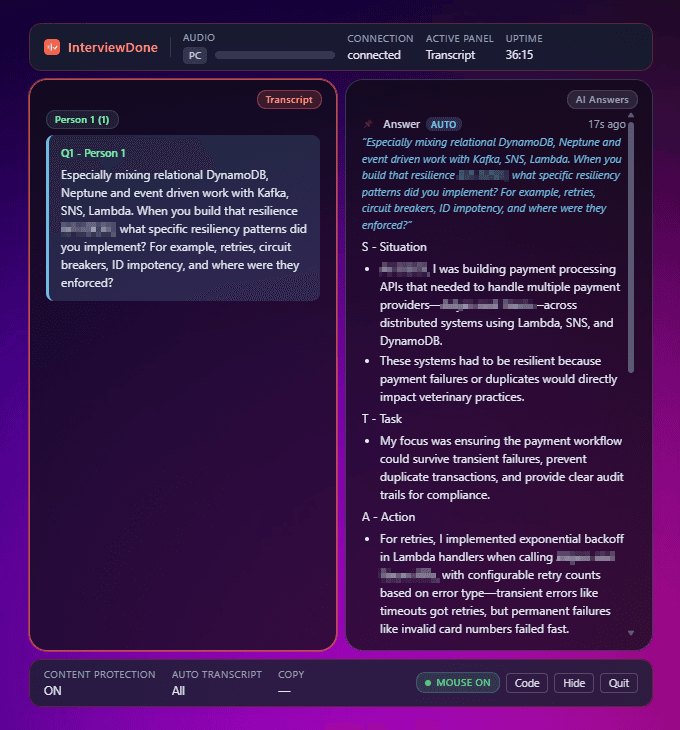
Compact keeps the same transcript and answers in a narrow window you can park beside the call.
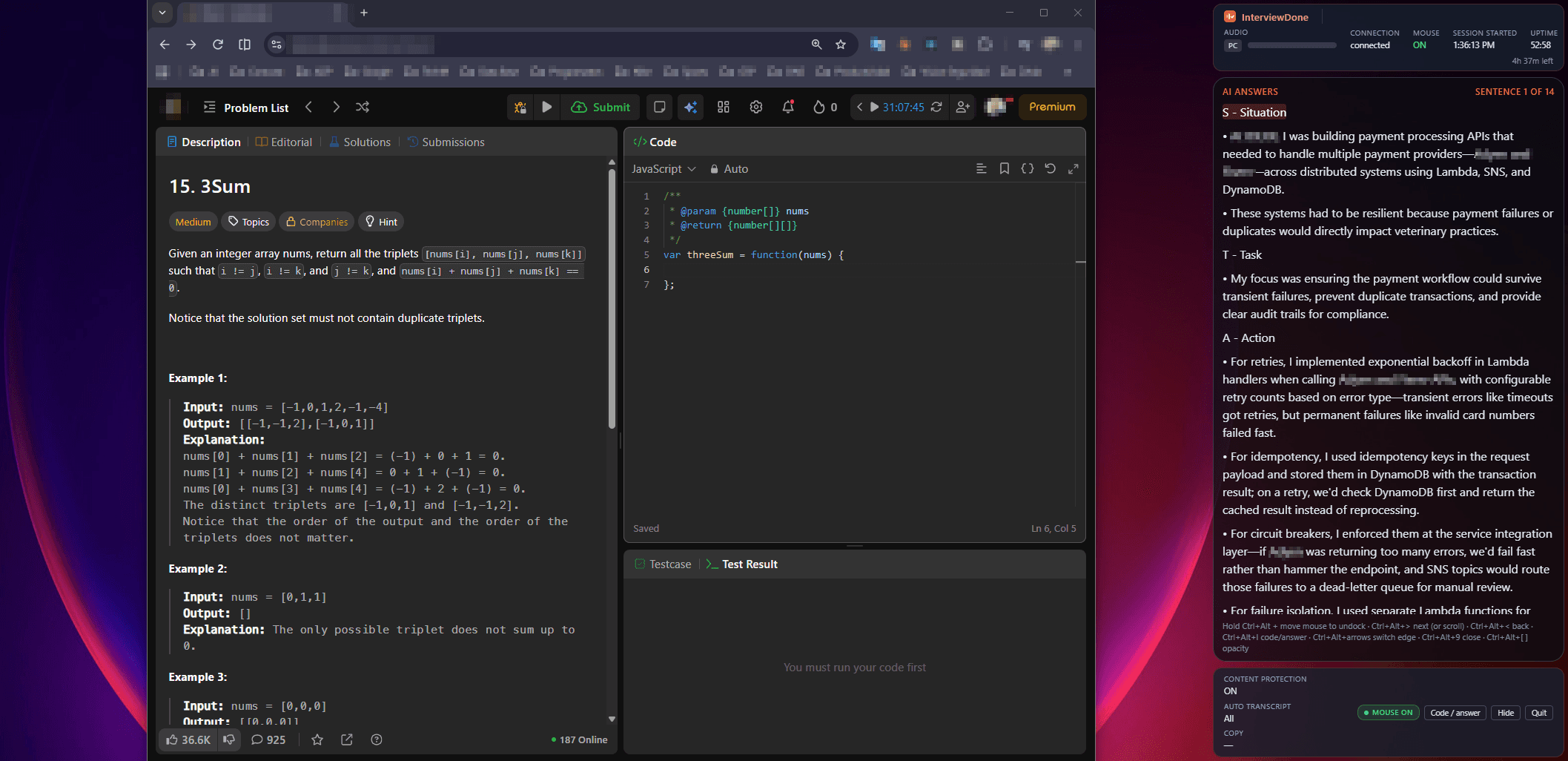
Card mode docks the answer to the edge of the screen and steps through it a sentence at a time, so you can read it aloud and keep your eyes on the call.
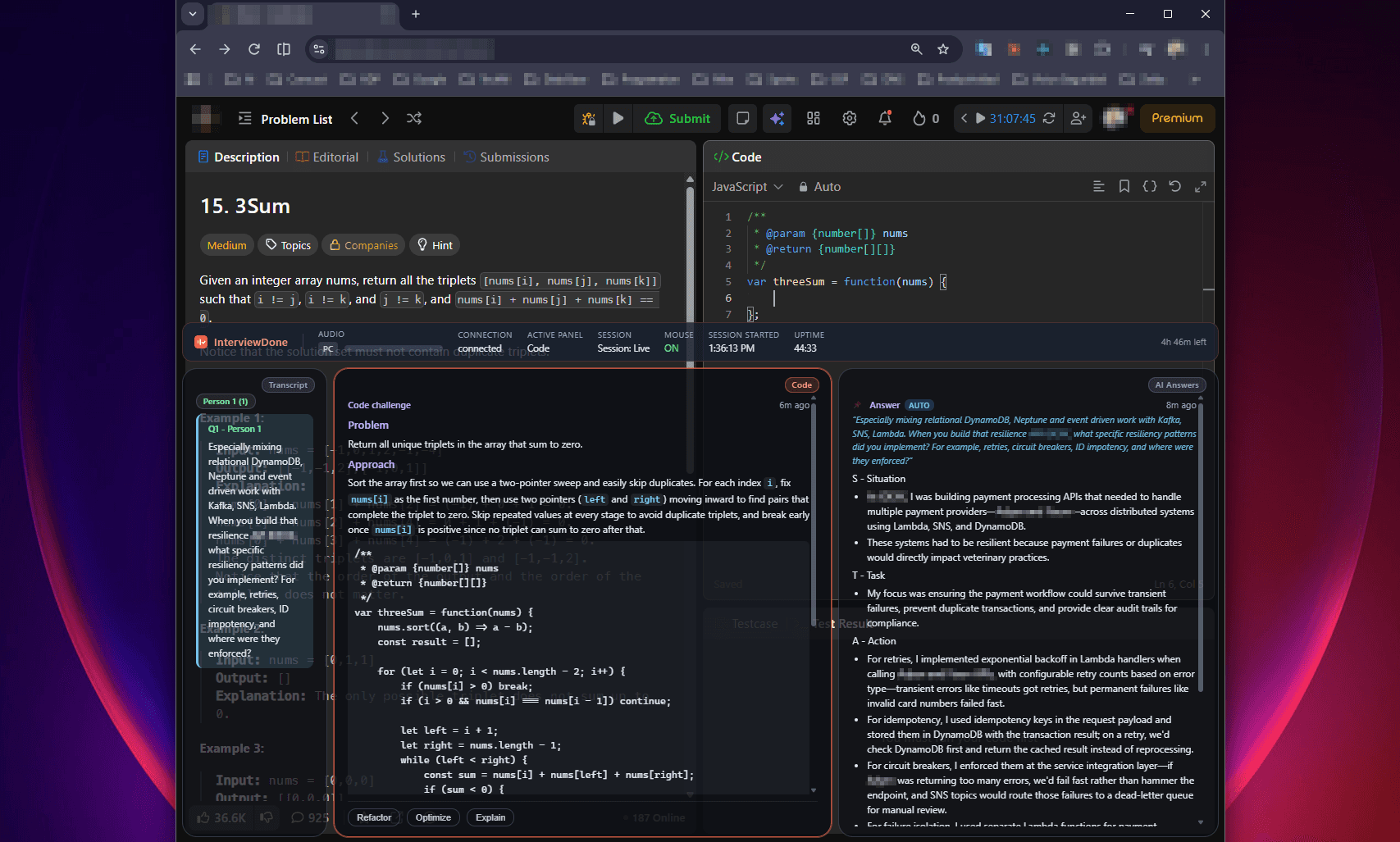
A working solution and the approach behind it, beside the editor you are typing in.
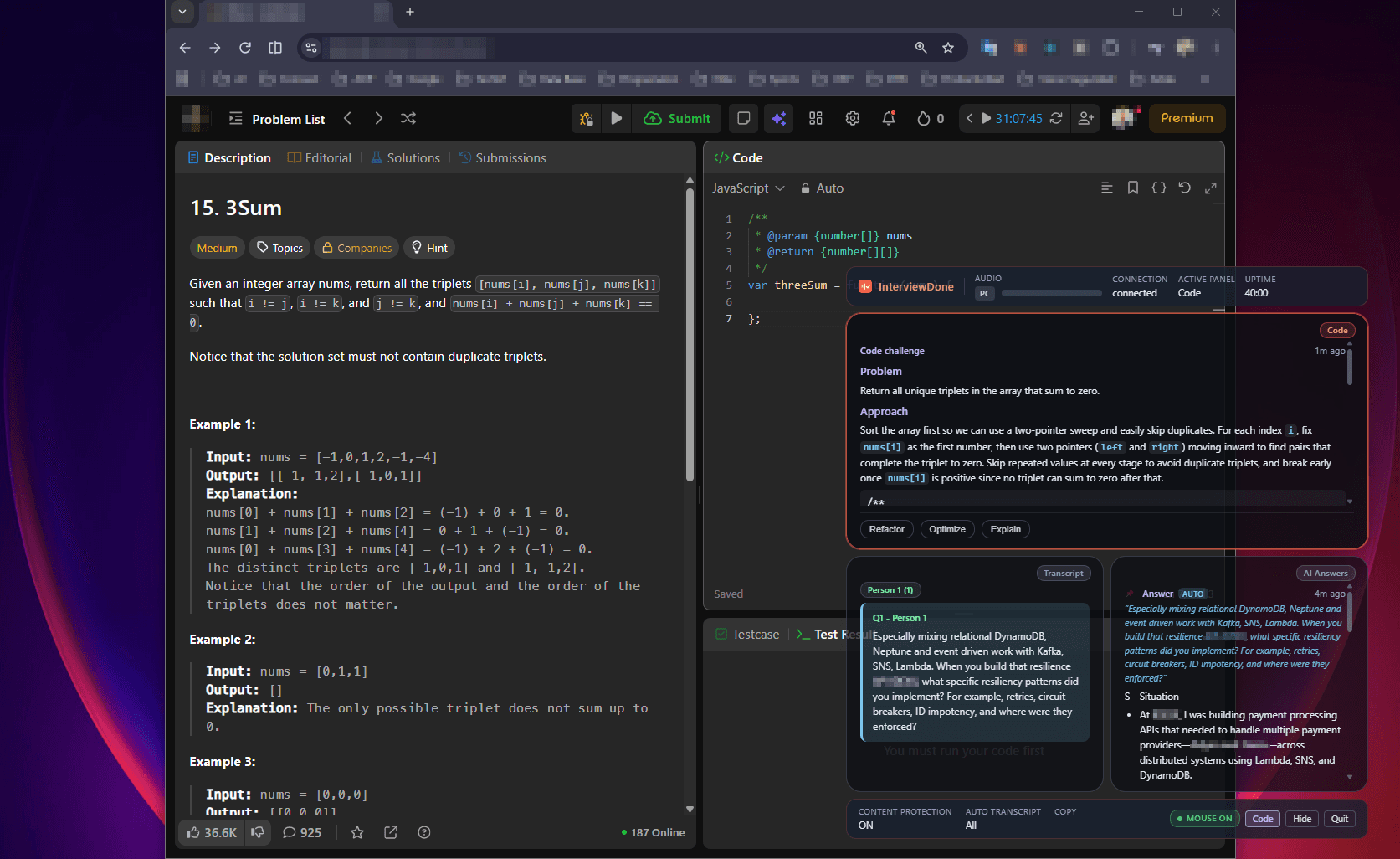
Compact shrinks the overlay so the problem statement and your editor stay in view.
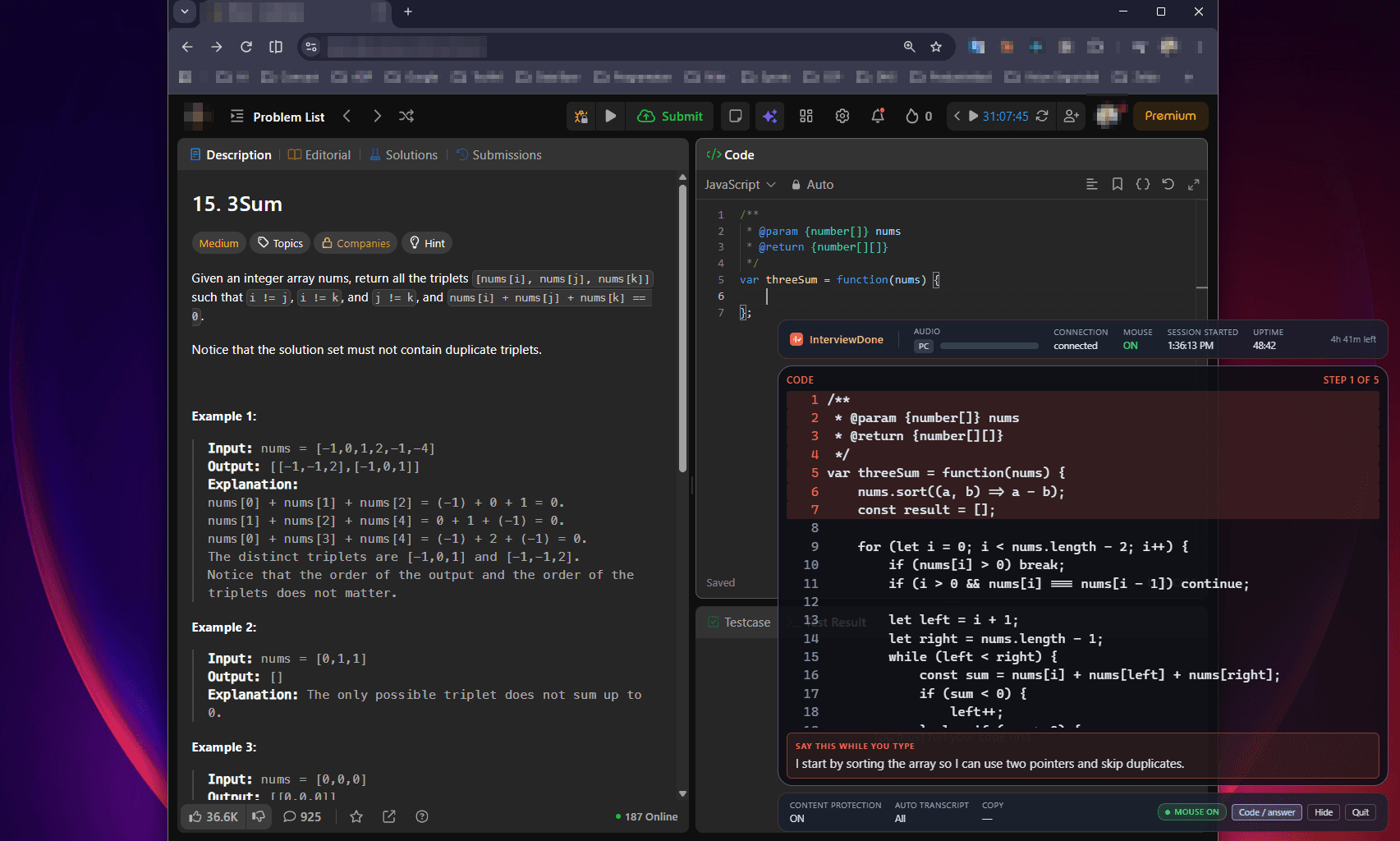
Card mode walks the solution step by step, with a sentence to say while you type each one, so you are never coding in silence.
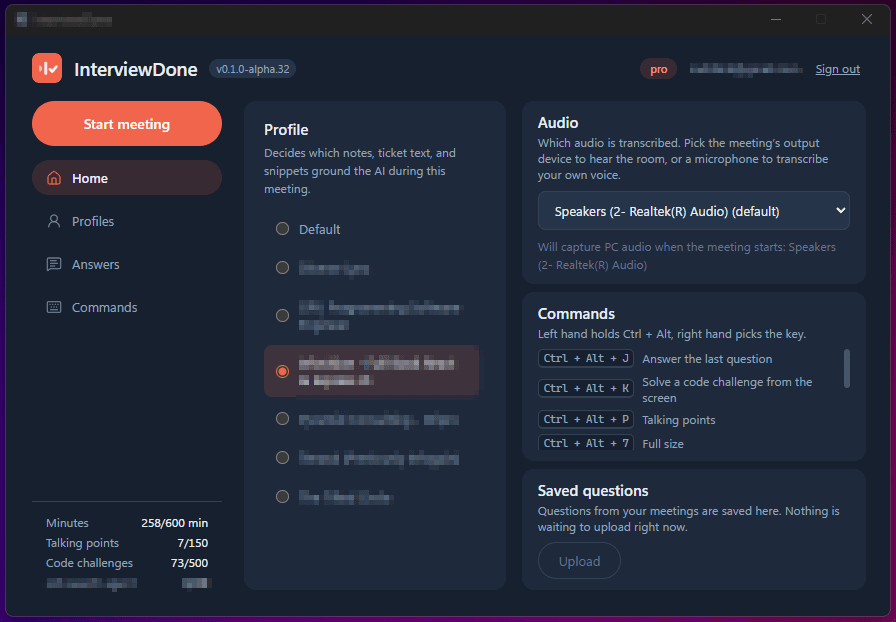
Pick the profile that grounds the AI, choose which audio to transcribe, and start. Everything else is a hotkey.
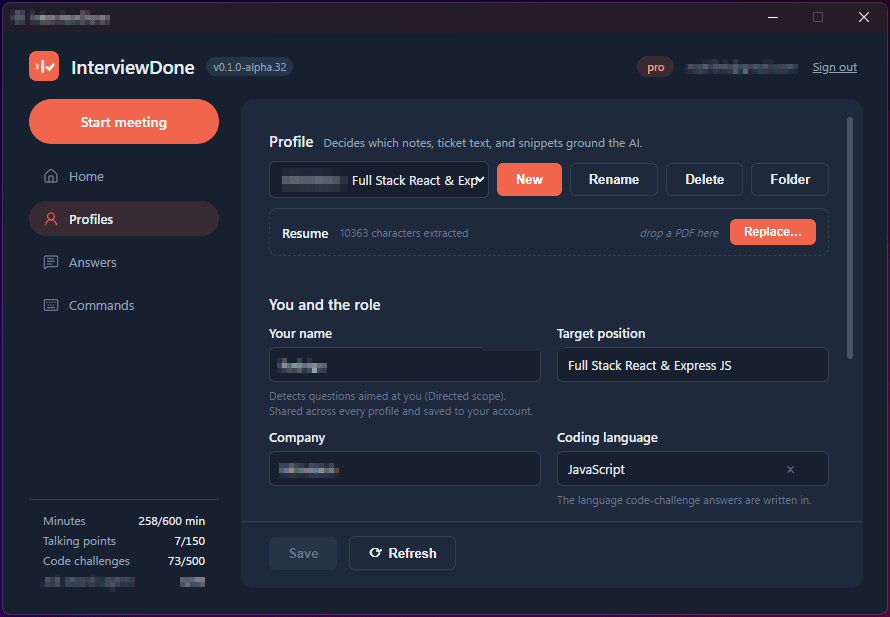
Your resume, the role, and your notes. This is the material every answer is built from.
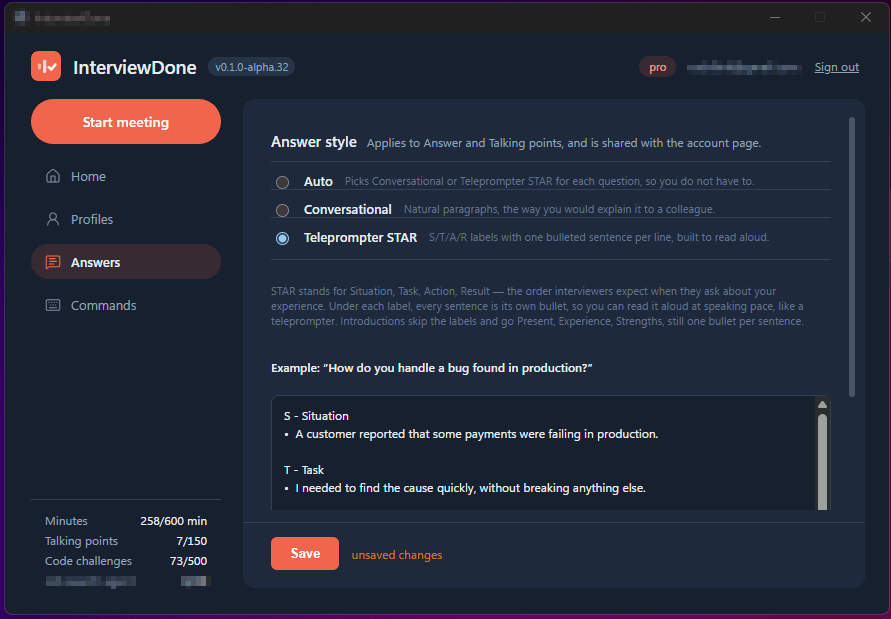
Choose how answers read: natural paragraphs, or Situation, Task, Action, Result bullets built to read aloud.
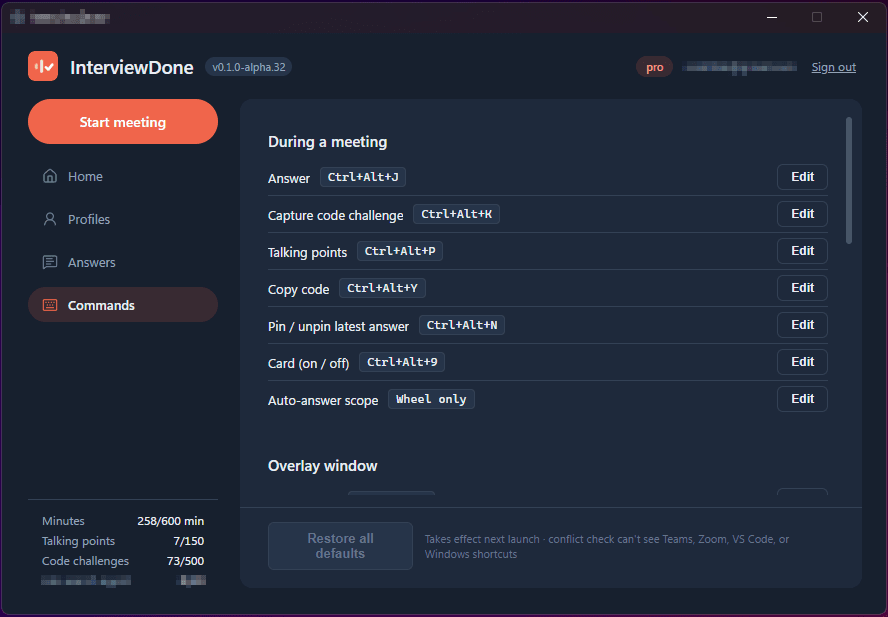
Every hotkey in one place, and each one can be remapped.
Features
Live interview support
The hard part of an interview is not knowing the answer, it is finding it under pressure. InterviewDone follows the conversation and does that part for you.
Real-time question detection
Knows when you have actually been asked something, and when someone is just talking.
Answers from your own material
Draws on the resume and job description you gave it, so the answer sounds like you.
Knows who is asking
Separates speakers, so a question from the hiring manager reads differently from one on your side.
Technical interviews
Screenshot the problem on your screen and get a worked solution back, with the reasoning laid out rather than just an answer to read aloud.
Screenshot to solution
Capture a coding problem and get a working approach back in seconds.
Walks the approach
Explains why the solution works, so you can talk through it instead of reciting it.
Any programming language
Reads the problem off your screen whatever it is written in. Spoken-language support is English for now.
Yours alone, and private
InterviewDone runs on your machine. It stays out of the screen you share, and the material you feed it is yours.
Stays out of your shared screen
Runs as a local overlay, so screen sharing shows your work and not your assistant.
Your context stays yours
Your resume and call audio are processed for your session, not used to train models.
Useful past the interview
A live, speaker-separated transcript you can scroll back through for the meetings that fill the rest of your week.
Windows desktop app
A native Windows app for now. macOS is not supported yet.
Right-click any text
Select something on the overlay and right-click it to ask the AI about it, or copy it.
- 1. Press Ctrl+Alt+M if the mouse is off. It is on when a meeting starts.
- 2. Drag to select text in the transcript or an answer.
- 3. Right-click the selection and pick an option.
Ask AI
Select a question and it answers it, in your answer style, even when the interviewer paused and the transcript split it into two lines. Select a word or term instead and it explains what it is and how to talk about it in this conversation.
Copy
Copies the selected text to your clipboard as plain sentences, without the speaker labels.
Launch pricing
Start free. Paid plans are coming as the alpha opens up.
WHAT YOU GET
On this plan:
- 10 minutes of live assistance per month
- Real-time question detection
- Live transcript with speaker separation
- 1 context profile
- Ground answers in the job description
WHAT YOU GET
On this plan:
- 2 hours of live assistance per month
- Real-time question detection
- Live transcript with speaker separation
- 2 context profiles
- Ground answers in the job description
- Ground answers in your resume
- 15 code challenge screenshots per month
- 20 talking points per month
- Email support
Pro
$19.99/mo
WHAT YOU GET
On this plan:
- 10 hours of live assistance per month
- Real-time question detection
- Live transcript with speaker separation
- Unlimited context profiles
- Ground answers in the job description
- Ground answers in your resume
- 500 code challenge screenshots per month
- 150 talking points per month
- Full session history on the web
- Save your interview questions to your account
- Priority support
- 20 AI job searches a month
Elite
$49.99/mo
WHAT YOU GET
On this plan:
- 25 hours of live assistance per month
- Real-time question detection
- Live transcript with speaker separation
- Unlimited context profiles
- Ground answers in the job description
- Ground answers in your resume
- 200 code challenge screenshots per month
- 400 talking points per month
- Full session history on the web
- Save your interview questions to your account
- Priority support
- Unlimited AI job searches
Alpha
Be ready for the next one
InterviewDone is in alpha and available now on Windows. Create an account and download it.